---
> [!IMPORTANT]
>
> **Please check the announcement for upgrade notes on version 2.0!**
**🚀Project Website**: [CloudFlare ImgBed](https://cfbed.sanyue.de/)
Announcement
## Pinned
1. If you encounter issues during deployment or usage, please carefully read the documentation, FAQ, and existing issues first.
2. **Frontend repository**: [MarSeventh/Sanyue-ImgHub](https://github.com/MarSeventh/Sanyue-ImgHub)
3. **Note**: This repository is a remake of the [Telegraph-Image](https://github.com/cf-pages/Telegraph-Image) project. If you like this project, please support the original one as well.
## 2025.2.6 Version 2.0 Upgrade Notes
> The v2.0 beta version has been released, with many changes and optimizations compared to v1.0. However, the beta version may have potential instability. If you prefer stability, you may delay updating.
>
> Due to **changes in the build command**, this update requires **manual operation**. Please follow these steps:
>
> - Sync your forked repository to the latest version (ignore if already synced automatically)
> - Go to the Pages management page, enter `Settings` -> `Build`, edit the `Build configuration`, and set the `Build command` to `npm install`
> - All new version settings have been **migrated to the Admin Panel -> System Settings** interface, so generally no need to configure environment variables anymore. Settings made in the system settings interface will **override** environment variable settings. However, to ensure compatibility of images uploaded via the Telegram channel with the old version, **please keep any previously set Telegram-related environment variables!**
> - After confirming the above settings are correct, go to the Pages management page, enter `Deployments`, and `Retry` the last failed deployment.
## Notification About Switching to Telegram Channel
> Due to abuse of the telegraph image hosting, the upload channel has switched to Telegram Channel. Please **update to the latest version (see the last section of chapter 3.1 for update instructions)** and set `TG_BOT_TOKEN` and `TG_CHAT_ID` according to the deployment requirements in the documentation, otherwise upload functionality will not work.
>
> Also, the **KV database is now mandatory**; if not configured before, please configure it as per the documentation.
>
> For issues, please check section 5 FAQ first.
Quality Blogs & Videos
**Experience video**: [CloudFlare Free Image Hosting, easily protect your every wonderful moment! _ Bilibili](https://www.bilibili.com/video/BV1y3WGe4EGh/?vd_source=da5ecbe595e41089cd1bed95932b8bfd)
**Related tutorial videos**:
- [Build an online image hosting system using Cloudflare R2 + Pages, unlimited space, no blocking, super simple, completely free (youtube.com)](https://www.youtube.com/watch?v=T8VayuUMOzM)
**Related quality blogs (Thanks to every supportive contributor):**
- [CloudFlare-ImgBed project – yunsen2025's blog](https://www.yunsen2025.top/category/cloudflare-imgbed/)
- [Completely free, step-by-step tutorial to build an unlimited space private image hosting with Cloudflare, supports authentication and adult content detection! - yunsen2025's blog](https://www.yunsen2025.top/blog-cfpages-syq-imgbed)
- [Configure domestic CDN and split-line resolution for CloudFlare-ImgBed to enjoy ultimate speed at lowest cost! – yunsen2025's blog](https://www.yunsen2025.top/cloudflare-imgbed-fen-xian-pei-zhi-guo-nei-cdn/)
- [Build Telegram channel image hosting with Cloudflare Pages (lepidus.me)](https://blogstr.lepidus.me/post/1725801323700/)
- [Tutorial for free image hosting based on CloudFlare and Telegram - Liu Xueguan | Blog (sexy0769.com)](https://blog.sexy0769.com/skill/735.html)
- [CloudFlare + Github, build your own free image hosting - Datouding's small blog (luckyting.top)](https://luckyting.top/index.php/archives/20/)
## Recent Updates ([Update Log](https://cfbed.sanyue.de/guide/update-log.html)):
Add Features:
- Beautify error images
- Upload page supports preview of ico and more formats
# 1. Introduction
Free file hosting solution with full lifecycle features including **upload**, **management**, **read**, and **delete**, supporting **authentication**, **directories**, **image moderation**, **random images**, and other features (see [Feature Docs](https://cfbed.sanyue.de/guide/features.html) for details).

# 2. [Document](https://cfbed.sanyue.de)
Provides detailed deployment documentation, feature docs, development plans, FAQ, and more to help you get started quickly.
# 3. Show


Other page screenshots


# 4. Tips
- Frontend is open source, see [MarSeventh/Sanyue-ImgHub](https://github.com/MarSeventh/Sanyue-ImgHub).
- **Sponsor**: Maintaining the project is not easy. If you like it, please support the author. Your support is the motivation to keep going~
- **Sponsors**: Thanks to the following sponsors for supporting this project!
- **Contributors**: Thanks to the following contributors for their selfless contributions!
[](https://github.com/MarSeventh/CloudFlare-ImgBed/graphs/contributors)

# 5. Star History
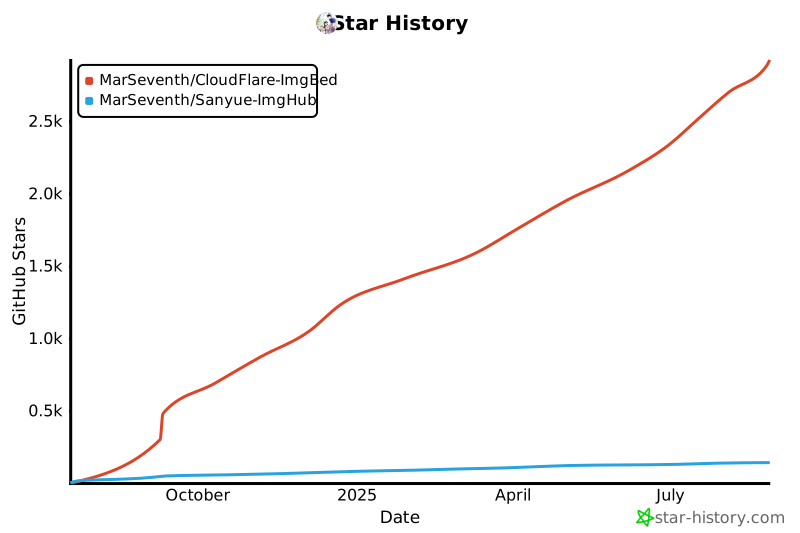
**If you like the project, please give a free star✨✨✨, thank you very much!**
[](https://star-history.com/#MarSeventh/CloudFlare-ImgBed&MarSeventh/Sanyue-ImgHub&Date)
# 6. Special Sponsors
- **[AsiaYun](https://www.asiayun.com/)**: Provides cloud computing resources support (high defense servers | Fuzhou high defense | Guangdong Telecom | Hong Kong servers | US servers | Overseas servers)
- **DartNode**: Provides cloud computing resources support
[](https://dartnode.com "Powered by DartNode - Free VPS for Open Source")





