mirror of
https://github.com/MarSeventh/CloudFlare-ImgBed.git
synced 2026-01-31 09:03:19 +08:00

276 lines
12 KiB
Markdown
276 lines
12 KiB
Markdown
<div align="center">
|
||
<a href="https://github.com/MarSeventh/CloudFlare-ImgBed"><img width="80%" alt="logo" src="static/readme/banner.png"/></a>
|
||
<p><em>🗂️Open-source file hosting solution, supporting Docker and serverless deployment, supporting multiple storage channels such as Telegram Bot, Cloudflare R2, S3, etc.</em> Modified version that replaces KV with D1 storage</p>
|
||
<p>
|
||
<a href="https://github.com/ccxyChuzhong/CloudFlare-ImgBed-D1/blob/main/README.md">简体中文</a> | <a href="https://github.com/ccxyChuzhong/CloudFlare-ImgBed-D1/blob/main/README_en.md">English</a> | <a href="https://github.com/MarSeventh/CloudFlare-ImgBed">KV Version (Original)</a> | <a href="https://github.com/ccxyChuzhong/CloudFlare-ImgBed-D1">D1 Version</a> | <a href="https://cfbed.sanyue.de/en">Official Website</a>
|
||
</p>
|
||
<div>
|
||
<a href="https://github.com/MarSeventh/CloudFlare-ImgBed/blob/main/LICENSE">
|
||
<img src="https://img.shields.io/github/license/MarSeventh/CloudFlare-ImgBed" alt="License" />
|
||
</a>
|
||
<a href="https://github.com/MarSeventh/CloudFlare-ImgBed/releases">
|
||
<img src="https://img.shields.io/github/release/MarSeventh/CloudFlare-ImgBed" alt="latest version" />
|
||
</a>
|
||
<a href="https://github.com/MarSeventh/CloudFlare-ImgBed/releases">
|
||
<img src="https://img.shields.io/github/downloads/MarSeventh/CloudFlare-ImgBed/total?color=%239F7AEA&logo=github" alt="Downloads" />
|
||
</a>
|
||
<a href="https://hub.docker.com/r/marseventh/cloudflare-imgbed">
|
||
<img src="https://img.shields.io/docker/pulls/marseventh/cloudflare-imgbed?style=flat-square" alt="Docker Pulls" />
|
||
</a>
|
||
<a href="https://github.com/MarSeventh/CloudFlare-ImgBed/issues">
|
||
<img src="https://img.shields.io/github/issues/MarSeventh/CloudFlare-ImgBed" alt="Issues" />
|
||
</a>
|
||
<a href="https://github.com/MarSeventh/CloudFlare-ImgBed/stargazers">
|
||
<img src="https://img.shields.io/github/stars/MarSeventh/CloudFlare-ImgBed" alt="Stars" />
|
||
</a>
|
||
<a href="https://github.com/MarSeventh/CloudFlare-ImgBed/network/members">
|
||
<img src="https://img.shields.io/github/forks/MarSeventh/CloudFlare-ImgBed" alt="Forks" />
|
||
</a>
|
||
</div>
|
||
</div>
|
||
|
||
|
||
---
|
||
|
||
> [!IMPORTANT]
|
||
>
|
||
> **Please check the announcement for upgrade notes on version 2.0!**
|
||
|
||
|
||
<details>
|
||
<summary>Announcement</summary>
|
||
|
||
## Pinned
|
||
|
||
1. If you encounter issues during deployment or usage, please carefully read the documentation, FAQ, and existing issues first.
|
||
2. **Note**: This repository is a remake of the [Telegraph-Image](https://github.com/cf-pages/Telegraph-Image) project. If you like this project, please support the original one as well.
|
||
|
||
## 2025.2.6 Version 2.0 Upgrade Notes
|
||
|
||
> The v2.0 version has been released, with many changes and optimizations compared to v1.0. However, the beta version may have potential instability. If you prefer stability, you may delay updating.
|
||
>
|
||
> Due to **changes in the build command**, this update requires **manual operation**. Please follow these steps:
|
||
>
|
||
> - Sync your forked repository to the latest version (ignore if already synced automatically)
|
||
> - Go to the Pages management page, enter `Settings` -> `Build`, edit the `Build configuration`, and set the `Build command` to `npm install`
|
||
> - All new version settings have been **migrated to the Admin Panel -> System Settings** interface, so generally no need to configure environment variables anymore. Settings made in the system settings interface will **override** environment variable settings. However, to ensure compatibility of images uploaded via the Telegram channel with the old version, **please keep any previously set Telegram-related environment variables!**
|
||
> - After confirming the above settings are correct, go to the Pages management page, enter `Deployments`, and `Retry` the last failed deployment.
|
||
|
||
## Notification About Switching to Telegram Channel
|
||
|
||
> Due to abuse of the telegraph image hosting, the upload channel has switched to Telegram Channel. Please **update to the latest version (see the last section of chapter 3.1 for update instructions)** and set `TG_BOT_TOKEN` and `TG_CHAT_ID` according to the deployment requirements in the documentation, otherwise upload functionality will not work.
|
||
>
|
||
> Also, the **KV database is now mandatory**; if not configured before, please configure it as per the documentation.
|
||
>
|
||
> For issues, please check section 5 FAQ first.
|
||
|
||
</details>
|
||
|
||
|
||
# Important! Important! Important!
|
||
If you are using KV storage and want to migrate to D1 storage, it is recommended to create a new image hosting service. Use the system's backup and restore functions for data migration!!!!
|
||
|
||
<details>
|
||
<summary>Detailed KV to D1 Storage Migration Guide</summary>
|
||
|
||
- First, confirm that your D1 database has been created: The database name must be: `imgbed-database`. Execute all SQL statements section by section:
|
||
```sql
|
||
-- CloudFlare ImgBed D1 Database Initialization Script
|
||
-- This script is used to initialize the D1 database
|
||
|
||
-- Drop existing tables (if re-initialization is needed)
|
||
-- Note: Use with caution in production environment
|
||
-- DROP TABLE IF EXISTS files;
|
||
-- DROP TABLE IF EXISTS settings;
|
||
-- DROP TABLE IF EXISTS index_operations;
|
||
-- DROP TABLE IF EXISTS index_metadata;
|
||
-- DROP TABLE IF EXISTS other_data;
|
||
|
||
-- Execute main database schema creation
|
||
-- This will include the content of schema.sql
|
||
|
||
-- 1. Files table - stores file metadata
|
||
CREATE TABLE IF NOT EXISTS files (
|
||
id TEXT PRIMARY KEY,
|
||
value TEXT,
|
||
metadata TEXT NOT NULL,
|
||
file_name TEXT,
|
||
file_type TEXT,
|
||
file_size TEXT,
|
||
upload_ip TEXT,
|
||
upload_address TEXT,
|
||
list_type TEXT,
|
||
timestamp INTEGER,
|
||
label TEXT,
|
||
directory TEXT,
|
||
channel TEXT,
|
||
channel_name TEXT,
|
||
tg_file_id TEXT,
|
||
tg_chat_id TEXT,
|
||
tg_bot_token TEXT,
|
||
is_chunked BOOLEAN DEFAULT FALSE,
|
||
created_at DATETIME DEFAULT CURRENT_TIMESTAMP,
|
||
updated_at DATETIME DEFAULT CURRENT_TIMESTAMP
|
||
);
|
||
|
||
-- 2. System configuration table
|
||
CREATE TABLE IF NOT EXISTS settings (
|
||
key TEXT PRIMARY KEY,
|
||
value TEXT NOT NULL,
|
||
category TEXT,
|
||
description TEXT,
|
||
created_at DATETIME DEFAULT CURRENT_TIMESTAMP,
|
||
updated_at DATETIME DEFAULT CURRENT_TIMESTAMP
|
||
);
|
||
|
||
-- 3. Index operations table
|
||
CREATE TABLE IF NOT EXISTS index_operations (
|
||
id TEXT PRIMARY KEY,
|
||
type TEXT NOT NULL,
|
||
timestamp INTEGER NOT NULL,
|
||
data TEXT NOT NULL,
|
||
processed BOOLEAN DEFAULT FALSE,
|
||
created_at DATETIME DEFAULT CURRENT_TIMESTAMP
|
||
);
|
||
|
||
-- 4. Index metadata table
|
||
CREATE TABLE IF NOT EXISTS index_metadata (
|
||
key TEXT PRIMARY KEY,
|
||
last_updated INTEGER,
|
||
total_count INTEGER DEFAULT 0,
|
||
last_operation_id TEXT,
|
||
chunk_count INTEGER DEFAULT 0,
|
||
chunk_size INTEGER DEFAULT 0,
|
||
created_at DATETIME DEFAULT CURRENT_TIMESTAMP,
|
||
updated_at DATETIME DEFAULT CURRENT_TIMESTAMP
|
||
);
|
||
|
||
-- 5. Other data table
|
||
CREATE TABLE IF NOT EXISTS other_data (
|
||
key TEXT PRIMARY KEY,
|
||
value TEXT NOT NULL,
|
||
type TEXT,
|
||
description TEXT,
|
||
created_at DATETIME DEFAULT CURRENT_TIMESTAMP,
|
||
updated_at DATETIME DEFAULT CURRENT_TIMESTAMP
|
||
);
|
||
|
||
-- Insert initial index metadata
|
||
INSERT OR REPLACE INTO index_metadata (key, last_updated, total_count, last_operation_id)
|
||
VALUES ('main_index', 0, 0, NULL);
|
||
|
||
-- Initialization complete
|
||
-- Database is ready, data migration can begin
|
||
|
||
```
|
||
|
||
### Configure Pages Bindings in Cloudflare Dashboard
|
||
|
||
#### Step A: Login to Cloudflare Dashboard
|
||
1. Visit https://dash.cloudflare.com
|
||
2. Login to your account
|
||
|
||
#### Step B: Enter Pages Project
|
||
1. Click **"Pages"** in the left menu
|
||
2. Find and click your image hosting project
|
||
|
||
#### Step C: Configure Functions Bindings
|
||
1. Click the **"Settings"** tab on the project page
|
||
2. Click **"Functions"** in the left menu
|
||
3. Scroll down to find the **"D1 database bindings"** section
|
||
|
||
#### Step D: Add D1 Binding
|
||
1. Click the **"Add binding"** button
|
||
2. Fill in the following information:
|
||
- **Variable name**: `DB` (must be uppercase DB)
|
||
- **D1 database**: Select your created `imgbed-database` from the dropdown
|
||
3. Click the **"Save"** button
|
||
|
||
#### Step E: Redeploy Pages
|
||
|
||
After configuring bindings, you need to redeploy:
|
||
|
||
#### Step F: Verify Configuration
|
||
|
||
After deployment is complete, visit the following URL to verify configuration:
|
||
|
||
```
|
||
https://your-domain.com/api/manage/migrate?action=check
|
||
```
|
||
|
||
View detailed configuration status:
|
||
```
|
||
https://your-domain.com/api/manage/migrate?action=status
|
||
```
|
||
</details>
|
||
|
||
|
||
|
||
|
||
# 1. Introduction
|
||
|
||
Free file hosting solution with full lifecycle features including **upload**, **management**, **read**, and **delete**, supporting **authentication**, **directories**, **image moderation**, **random images**, and other features (see [Feature Docs](https://cfbed.sanyue.de/en/guide/features.html) for details).
|
||
|
||

|
||
|
||
# 2. [Document](https://cfbed.sanyue.de/en)
|
||
|
||
Provides detailed deployment documentation, feature docs, development plans, update logs, FAQ, and more to help you get started quickly.
|
||
|
||
[](https://cfbed.sanyue.de/en/guide/update-log.html)
|
||
|
||
# 3. Demo
|
||
|
||
**Demo Address**: [CloudFlare ImgBed](https://cfbed.1314883.xyz/) Access Password: `cfbed`
|
||
|
||

|
||
|
||

|
||
|
||
<details>
|
||
<summary>Other page screenshots</summary>
|
||
|
||

|
||
|
||

|
||
|
||

|
||
|
||

|
||
|
||
</details>
|
||
|
||
# 4. Tips
|
||
|
||
- Frontend is open source, see [MarSeventh/Sanyue-ImgHub](https://github.com/MarSeventh/Sanyue-ImgHub).
|
||
|
||
- **Ecosystem**: We welcome community participation in the ecosystem construction. Feel free to submit PRs or Issues, and high-quality content can be found on the [official ecosystem page](https://cfbed.sanyue.de/en/about/ecosystem.html).
|
||
|
||
- **Sponsor**: Maintaining the project is not easy. If you like it, please support the author. Your support is the motivation to keep going~
|
||
|
||
<a href="https://afdian.com/a/marseventh"><img width="200" src="https://pic1.afdiancdn.com/static/img/welcome/button-sponsorme.png" alt=""></a>
|
||
|
||
- **Sponsors**: Thanks to the following sponsors for supporting this project!
|
||
|
||
[](https://afdian.com/a/marseventh)
|
||
|
||
- **Contributors**: Thanks to the following contributors for their selfless contributions!
|
||
|
||
[](https://github.com/MarSeventh/CloudFlare-ImgBed/graphs/contributors)
|
||
|
||
# 5. Star History
|
||
|
||
**If you like the project, please give a free star✨✨✨, thank you very much!**
|
||
|
||
[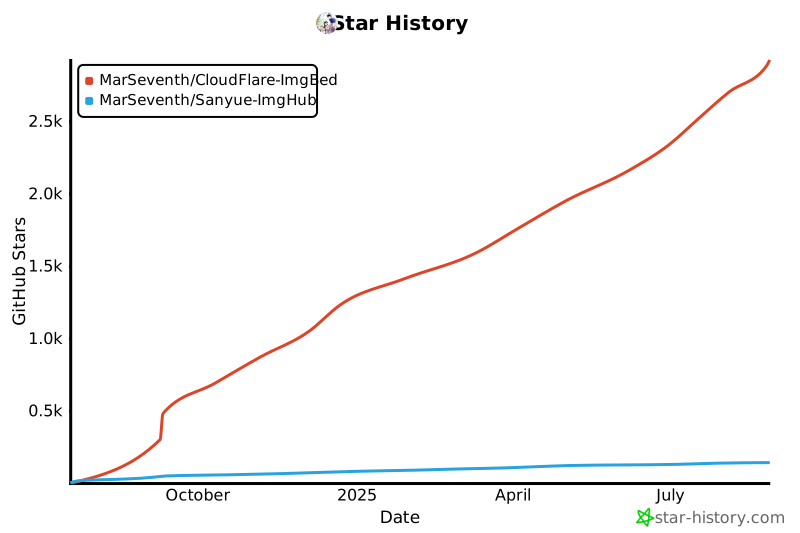](https://star-history.com/#MarSeventh/CloudFlare-ImgBed&MarSeventh/Sanyue-ImgHub&Date)
|
||
|
||
# 6. Special Sponsors
|
||
|
||
- **[CloudFlare](https://www.cloudflare.com) & [EdgeOne](https://edgeone.ai/?from=github)**:Provides CDN acceleration, and security protection
|
||
|
||
<a href="https://www.cloudflare.com"><img src="static/readme/cloudflare-logo.png" alt="Cloudflare Logo" height="25"></a> <a href="https://edgeone.ai/?from=github"><img src="https://edgeone.ai/media/34fe3a45-492d-4ea4-ae5d-ea1087ca7b4b.png" alt="Tencent Logo" height="25"></a>
|
||
|
||
- **[AsiaYun](https://www.asiayun.com) & [DartNode](https://dartnode.com)**:Provides cloud computing resources support
|
||
|
||
[](https://dartnode.com "Powered by DartNode - Free VPS for Open Source")
|